Mackie ProFX12v3
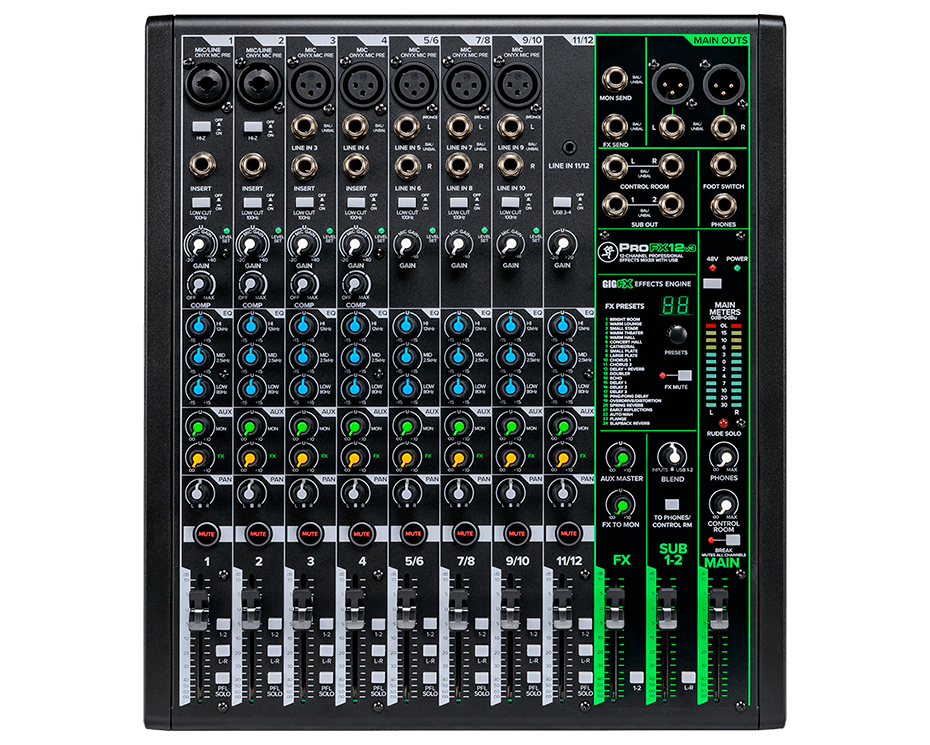
What it is
The ProFX12v3 is the plain (non-plus) model in the ProFXv3 line, which Mackie lists alongside the 6, 10, 16, 22 and 30 channel versions. Mackie describes it as an analog mixer with a USB audio interface, effects, and Onyx mic preamps, aimed at musicians and creators who want high-resolution audio. What distinguishes it from the ProFX12v3+ is that the plus model adds Bluetooth, USB-C, a color LCD for editing effects, and separate FX, monitor and subgroup buses. The plain v3 has no LCD and no Bluetooth. Several listings and reviews mix the two models, so catalogue data for the plain v3 should be checked against the model name on the unit. The v3 name is shared across the ProFXv3 family, which followed the v2 (released 2015) and v1 (2012). Sound On Sound describes the v3 as a slightly sideways step from the v2, losing some features and gaining others. The mixer is a budget product. Reviewers have described it as suitable for small live setups and basic studio recording. Published reviews are mostly several years old, and no independent measurements or long-term durability reports were found.
Specifications
- Channels and inputs
- 12 channels. Sources disagree on the layout: Bill's Music lists 8 mono and 1 stereo channel; a Guitar Center listing describes six balanced XLR mic inputs and 12 balanced/unbalanced line inputs; Sound On Sound reports seven mic/line input channels, the first two with combi jack/XLR sockets and Hi-Z switches.
- Mic preamps
- Mackie states seven low-noise, high-headroom Onyx preamps providing 60 dB of gain.
- Phantom power
- 48 V on every mic input (Bill's Music). A Sweetwater reviewer notes it is global and cannot be switched per channel.
- Frequency response
- Flat within 1 dB from 20 Hz to 30 kHz (Sound On Sound, for the v3 range).
- Maximum level
- Up to +22 dBu input; +28 dBu available at the output (Sound On Sound, for the v3 range).
- Noise and crosstalk
- Residual output noise below -95 dB with faders down; crosstalk better than -90 dB (Sound On Sound, for the v3 range).
- Channel EQ
- Three fixed bands: high and low shelving filters at 12 kHz and 80 Hz, and a fixed mid at 2.5 kHz, each with a range of ±15 dB. An on/off hard bypass switch is included (Mackie).
- Compression
- Single-knob compressors on channels 1-4 (Music On Stage). The Podcast Consultant mentions one of four compressors; Bill's Music lists built-in channel compression.
- Filters
- 100 Hz low-cut filter on all channels (Bill's Music).
- Effects
- 24 included effects, including reverbs, delays and choruses, via the GigFX engine (Mackie). Sound On Sound reports 34 preset effects. Effects are presets with level as the only adjustment (Sound On Sound).
- USB
- Class-compliant USB audio interface, described as USB 2 x 4 with a USB-B connector. Optimized for recording at sample rates up to 192 kHz, with a dual stereo USB return (Mackie).
- Instrument inputs
- Switchable Hi-Z inputs for guitar, bass and other instruments (Mackie).
- Faders
- 11 x 60 mm faders (Bill's Music).
- Headphones
- Headphone output with independent volume control (Mackie).
- Software
- Avid Pro Tools First and the Mackie Musician Collection (Sound On Sound); Waveform OEM software (Mackie).
- Price
- $359.99 USD in one retailer snapshot (The Podcast Consultant). Prices change over time.
How it's used
The mixer is used for small live sound, such as a small band or a coffee-shop performance, and for podcasting, streaming and capturing live performances. Reviewers have used it to record ideas in two-track through USB, and as a submixer or practical live mixer in home studios. Sources also describe daisy-chaining a second mixer to add channels. Mackie positions it for recording a podcast or performing at a coffee shop.
Suggested usage
Avoid USB feedback loops
When recording via USB, do not route the USB return back into the mix output, which creates a feedback loop (Sound On Sound).
Check phantom power first
Phantom power is global on all mic inputs, so confirm that every connected microphone and source can tolerate 48 V before connecting.
Set preamp gain before the faders
The preamps are clean and quiet, but gain staging still determines the result. Set the preamp level before using the faders.
Check compressor amount before relying on it
The one-knob compressors give gradual, largely non-intrusive gain reduction. Harmony Central and Mixdown describe the compression as subtle, so verify the amount before depending on it.
Choose effects with the presets in mind
Effects are preset-based with a single level control. Sound On Sound suggests a plate or room reverb for vocals.
Use the 2x4 USB routing
Use one USB stereo return for monitoring and the other for playback, as Mackie's description suggests.
What reviewers said
- Sound On Sound
Recommends the mixer as a budget product that covers the essentials for small live setups or basic studio recording. Lists the lack of master inserts, a more comprehensive EQ and more foldback sends as drawbacks, which the reviewer considers reasonable at this price.
- Harmony Central
Says the mixer covers most needs short of a professional studio or large venue. Notes that more powerful and customizable boards exist, but considers it suitable for most small venues and players, and praises the Onyx preamps for clean, quiet amplification.
- Mixdown Magazine
An older Australian review that praises the layout, describing the channel strips and global FX section as easy to navigate. The main criticism is how subtle the compressor is.
- Music On Stage
A recent Australian review. Describes the effects as usable reverbs, delays and choruses that are good rather than outstanding, and says the faders stay smooth after years of use.
- Sweetwater customer reviews
Mixed user reviews. One reviewer praised the setup. Another found the board not right for them. A reviewer upgrading from a ProFX8v2 found it less rugged than the older unit but praised the preamp quality.
Sources
- ProFX12v3 12-Channel Analog Mixer with USB - MACKIE
- OWNER’S MANUAL www.mackie.com MULTI-CHANNEL ANALOG MIXERS WITH ENHANCED FX,
- Mackie ProFX12v3+ 12-channel Mixer Reviews
- Musician reviews: Mackie ProFX12v3+ 12-channel Mixer
- Mackie ProFXv3 Series Professional Effects Mixer - Live Sound - Harmony Central
- Mackie ProFX12v3
- Mackie ProFX12v3 12-channel Mixer with USB and Effects - Bill's Music
- Mackie ProFX12v3 12-Channel Professional Effects Mixer With USB
- Mackie ProFX12v3 12-channel Mixer with Rackmount Kit Reviews
- Mackie ProFX: 2-Channel Professional Analog Mixer with USB - The Podcast Consultant
- Mackie ProFX12v3 Review: 12-Channel USB Mixer That Actually Delivers - Music On Stage
- Mackie ProFX12v3 12-Channel Sound Reinforcement Mixer with Built-In FX
- Mackie ProFX12v3 12-channel Mixer with USB and Effects Reviews
- ProFX12v3
- MIXER ADVICE: Mackie ProFx V2 vs V3