TC Electronics Ditto X4 Looper
What it is
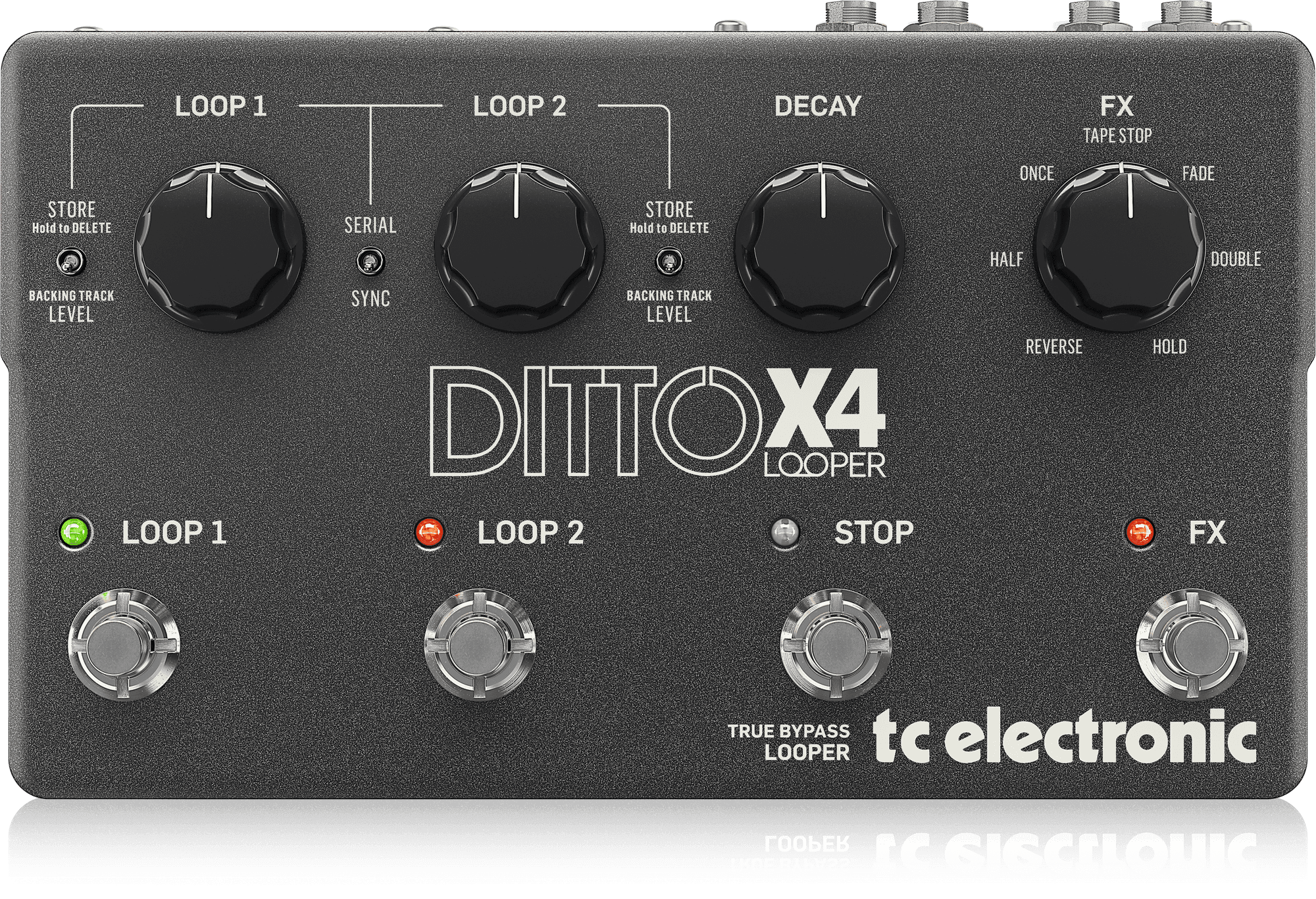
The Ditto X4 records and plays back two independent loops. Each loop has its own footswitch, and a separate Stop footswitch and an FX footswitch complete the four-switch layout. A Serial/Sync switch determines whether the loops play one at a time, which suits separate song sections, or together, where the first loop sets the phrase length and the second runs in multiples of it. The X4 is the dual-track successor to the single-loop Ditto and the stereo Ditto X2, using the same design lineage and adding a second loop track and two more footswitches. It is not the same product as the Ditto Jam X2, which is marketed around its BeatSense tempo-tracking feature. TC Electronic announced the Ditto X4 in January 2016. Reviewers describe it as one of the larger pedals in the Ditto line.
Specifications
- Announced
- January 2016
- Loop tracks
- Two, up to 5 minutes each
- Loop modes
- Serial and Sync, selected by a switch
- Loop effects
- Seven: Tape Stop, Fade, Double, Hold, Reverse, Half, Once
- Controls
- Four non-latching footswitches (Loop 1, Loop 2, Stop, FX); four top-panel dials for Loop 1 and Loop 2 volume, decay and FX selection
- Decay
- Knob that lowers the level of each earlier overdub layer on repeat
- Audio
- Stereo inputs and outputs; true bypass with analogue dry-through, or buffered bypass selectable on the rear panel
- MIDI
- MIDI IN and THRU for external clock sync and control
- USB
- Loops exported to a computer; audio files imported as backing tracks; firmware updates available from TC Electronic
- Import formats
- WAV, AIFF (export); WAV and MP3 (import), per the Mixdown review
- Dimensions
- 2.2 x 5.7 x 9.3 inches (Perfect Circuit)
- Power
- 9V DC centre-negative; Altomusic lists 9V DC/300mA
How it's used
Guitarists use the X4 for live looping and layering, often in Sync mode for stacked overdubs, and in Serial mode to record and switch between song sections such as verse and chorus. Its four footswitches allow hands-free control on stage. It is also used for playing back loops or imported audio as backing tracks, and for recording ideas in a studio. Reviewers place it near the start of the signal chain, with the stereo outputs feeding amplifiers or other effects.
Suggested usage
Set the rear DIP switches before a session
The four rear switches control record/play/overdub order, when overdubs start, when serial loops switch, and bypass type. Reviewers say the factory positions are a reasonable starting point, and the DIP settings can be adjusted for each setup.
Learn MIDI sync before relying on it
Several reviewers say MIDI sync takes time to learn. Start and stop timing is critical, and one user reported that incorrect timing caused problems. Practise with the external clock before a performance.
Choose bypass type for the signal chain
True bypass preserves tone best. Buffered bypass can help with long cable runs or many pedals in a chain, according to looperpedalreviews.com.
Check the input connection when using a mic
One Sweetwater reviewer heard buzzing from a microphone connected through an XLR-to-quarter-inch adapter and suspected the adapter. Looperpedalreviews.com reports that XLR connections are a little quieter.
Plan for the memory limit
Looperpedalreviews.com reports one storage slot per loop, allowing two stored loops at a time. Switching stored loops requires a USB connection to a computer.
Use half-speed and fade for arrangement
TC's page describes Half-speed playback for turning a riff into a bass line and Fade for creating an ending. These effects can be applied to the loop in performance.
What reviewers said
- MusicRadar
A 2016 review that praised the sound and ease of use, and described the dual loops as a significant improvement. It identified the MIDI sync learning curve as the main drawback.
- Looperpedalreviews.com
Rated the pedal 4.5 of 5. Praised sound quality, effects, dual tracks, four footswitches and MIDI sync, and criticised the storage limit, the lack of a metronome or drum tracks, and effects that apply to both loops at once. Recommended it for casual, on-the-fly players.
- Mixdown Magazine
Described the X4 as building on the original Ditto's ease of use and sound quality, and highlighted dual tracks, two loop modes, seven effects, decay, MIDI and USB transfer.
- Guitar Interactive
Recommended the pedal highly, describing it as well thought out. It noted a large footprint offset by well-spaced footswitches and praised the DIP switch setup options.
Sources
- DITTO X4 LOOPER
- TC Electronic Ditto X4 Looper Review
- TC Electronic Ditto Jam X2 Looper Pedal with Automatic Tempo Sync
- TC Electronic Ditto x 4 looper & BonaFide buffer
- TC Electronic Ditto X4 Looper review
- TC Electronic Ditto X4 Looper Pedal
- TC Electronic Ditto X4 Looper - Mixdown Magazine
- TC Electronic Ditto X4 Looper Effects Pedal
- TC Electronic Ditto X4 Looper - What To Know & Where To Buy
- TC Electronic Ditto X4 Looper
- www.tcelectronic.com
- TC Electronic Ditto X4 Looper Pedal
- TC Electronic Ditto X4 Looper Pedal
- TC Electronic Ditto X4 Looper Pedal
- TC Electronic Ditto X4 Looper Effects Pedal